

Bookstore
About Us & Services
Main Campus Bookstore Hours
Location: Student Union Building (Wellness Center), Room 141
Hours: Monday–Friday, 8:00 a.m. – 5:00 p.m.
Closed for lunch: 12:00 p.m. – 1:00 p.m.
Contact: ntubookstore@navajotech.edu
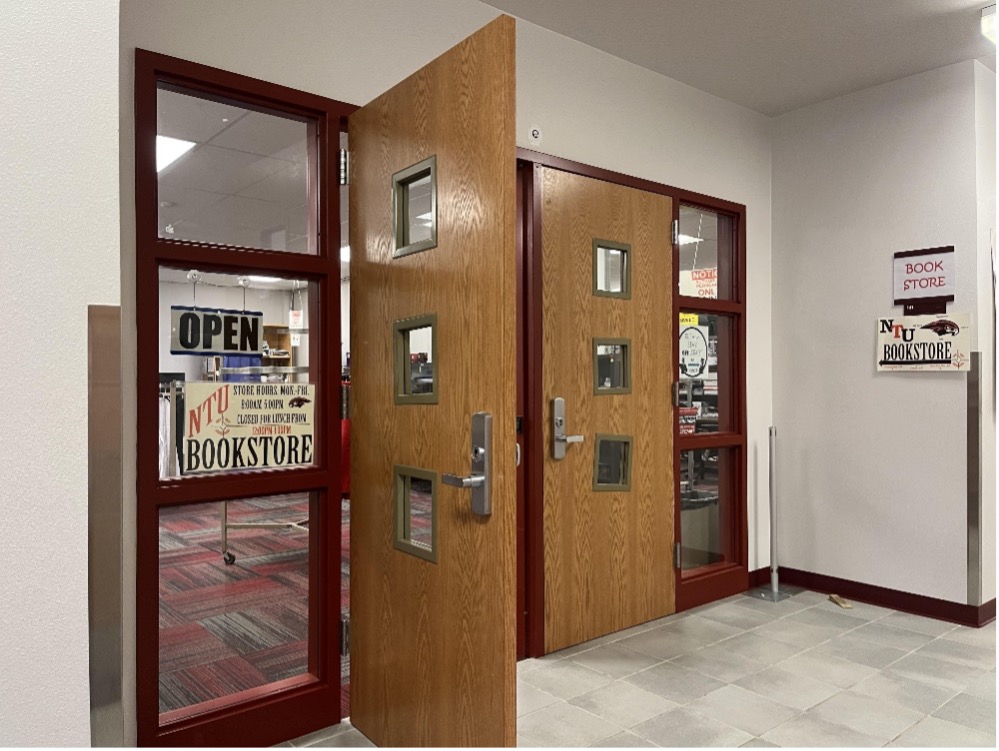
Welcome to the NTU Online Bookstore
Welcome to Navajo Technical University! We’re excited to have you here.
This guide is designed for both first-year and returning students and will walk you step by step through ordering textbooks, paying for materials, and accessing digital course content so you feel prepared and confident from day one.
Take your time, follow each step, and remember: the NTU Bookstore Team is here to help.
What Is the NTU Online Bookstore?
The NTU Online Bookstore is your one-stop location to:
- Find required and recommended textbooks for your courses
- Purchase physical books, eBooks, and access codes
- Use your Bookstore Charge Program (BCP) funds or personal payment methods
- Track orders, return eligible items, and access digital materials
Access the bookstore using your NTU Single Sign-On (SSO) account.
First-year and returning students who need help accessing NTU systems should contact the IT Department to set up or update their NTU Sign-In account.
IT Department Email: its@navajotech.edu
Step-by-Step Guide: How to Order Your Textbooks
STEP 1: Login
- Log in using your NTU SSO username and password
- Once logged in, you will see your personalized My Courses page
STEP 2: Review Courses and Required Books
- Your registered courses for the semester will appear automatically
- Each course will display materials selected by your instructor
Tips for First-Year Students:
- Double-check your selections
- Avoid ordering duplicate books
- Review format options carefully (eBook vs. physical book)
STEP 3: Add Books to Your Cart and Check Out
- Select the books you need
- Click the cart icon in the top-right corner
- Select Check Out Now
STEP 4: Choose Your Delivery Location
- Your home address
- An NTU campus location
- Another approved shipping address
Common NTU Locations:
- Navajo Technical University – Crownpoint Campus
- Shiwi College & Career Readiness Center (Zuni)
Please include your mobile phone number and save your shipping address.
STEP 5: Confirm Student Tax Exemption
- Check the enrollment certification box (full-time or part-time status)
- This ensures sales tax is not applied to your order
STEP 6: Choose Your Payment Method
Bookstore Charge Program (BCP)
- Eligible students may receive up to $500 per semester
- Charges are applied directly to your student account
- Helpful for students using financial aid
Personal Payment
- Credit card
- Debit card
No voucher or discount code is required.
Select Submit Payment to complete your order.
Below are more information about online Textbook orders.
Bookstore Charge Program (BCP)
The Bookstore Charge Program allows eligible students to purchase textbooks now and pay later.
- Available to registered NTU students
- Up to $500 per semester
- Charges are billed to your student account
When Is It Available?
- Opens approximately 4–5 weeks before classes begin
- Closes approximately one week after classes start
How Is It Paid?
- Financial aid (if eligible) is applied first
- Any remaining balance must be paid through Student Billing
Need a Voucher Increase?
If your total (books + shipping) exceeds your voucher amount, Email: ntubookstore@navajotech.edu
Include:
- Full name
- NTU Student ID
- Total amount requested
Tracking Your Book Order
- Log in to the NTU Online Bookstore
- Select the Track tab
- Enter your school email and order number
You can view:
- Order status
- Tracking numbers
- Delivery progress
Returns & Refunds
- Within 2 weeks after classes begin OR 30 days from order confirmation
- Items must remain in original, unused condition
- Some items (access codes and marketplace items) may not be refundable
How to Start a Return
- Log in to the bookstore
- Select Returns
- Choose your order and item
- Select a return reason
- Print the return label and follow the instructions
Refunds are generally processed within 10–14 business days.
Accessing Your Digital Books (VitalSource)
Access Your eBooks
- Log in to the NTU Online Bookstore
- Select your username → eLibrary
- Click Access Now
- Log in or create a VitalSource account using your NTU email
Your digital books will appear in your Bookshelf.
Access Codes & Courseware (Two-Step Process)
- Access materials through eLibrary
- Reveal and copy the access code
- Select Go to the Website and follow the publisher’s instructions
Please confirm that you have the correct course material before revealing access codes.
Students may also purchase supplies and receive assistance at the bookstore.
Available items include:
- Culinary, Baking, Veterinary, CNA, and Automotive materials
- School supplies
- NTU apparel and merchandise
Bring your class schedule if you plan to charge items to your student account.
Bookstore Resources
CONTACTS & INFORMATION
Customer Service:
Help Center: Help Customer TextbookX
Phone: 855-955-0398
Email: help@vitalsource.com
When contacting Customer Support, please include:
- Order number
- Your name
- Brief description of your issue
Additional Resources:
- Track Orders
- Returns
- Sell Your Textbooks
- FAQ and Help Videos
Quick Overview Video: Answers to FAQs
Website: NTU BookStore Online
Video Tutorial: Place an Order-Online Bookstore
Main Campus Bookstore
SUB Building, Room 141
(Across from NSSC Tutoring Center)
Bookstore Manager: Kami Morgan
Phone: 505.387.7497
Email: ntubookstore@navajotech.edu
2-Story Building
Bookstore Technician: Francine Bia
Phone: 928.882.3142
Email: fbia@navajotech.edu