
Online Learning for Dual Credit Students
PREPARATION FOR ONLINE COURSES
Information about online courses is available on the Student Onboarding page. The Student Onboarding page provides current guidance on technology readiness, required software, textbooks, syllabus preparation, IT support, online attendance, and logging in three to four times per week. For additional support and resources, visit the Student Support page, which includes information about Academic Support, Student Life, Career Development, Financial Resources, Cultural Resources, and other services available to students.
Before beginning an online dual-credit course, complete the two current onboarding and Blackboard orientation resources so you are ready to learn and succeed at NTU.
NTU Student Onboarding Page
The NTU Student Onboarding is the starting point for online-learning readiness. It provides guidance on technology requirements, required software, textbook and syllabus preparation, IT support, online attendance expectations, and logging in three to four times per week.
Blackboard Orientation
Blackboard Ultra is where students access courses, assignments, submissions, grades, discussions, and course materials. Sign in through NTU SSO and select Blackboard Ultra, or go directly to Blackboard Ultra using your NTU credentials.
In the Courses area and under terms Orientation, locate and complete Blackboard_Orientation_for_Learners before the first week of class. This self-paced resource helps learners navigate Blackboard, submit assignments, check grades, participate in discussions, communicate with instructors, review feedback, track progress, and connect with NetTutor.
Before Your Course Begins
Use this checklist to prepare for your online dual-credit course:
- Obtain your textbooks.
- Successfully log in to Blackboard.
- Review the syllabus for technology or software requirements.
- Confirm that you have access to a personal Windows or Mac computer and stable broadband internet.
- Know how to contact NTU IT support.
- Complete the NTU Student Onboarding page.
- Complete Blackboard_Orientation_for_Learners.
- Be ready to log in and participate from the first day.
Online attendance is taken as seriously as attendance in an on-campus course.
Please visit the tabs below for detail information.
How to Log In to the SSO Account
1 Enter your NTU username and password. (Note: IT department creates an account. If you do not have an SSO account, email its@navajotech.edu).
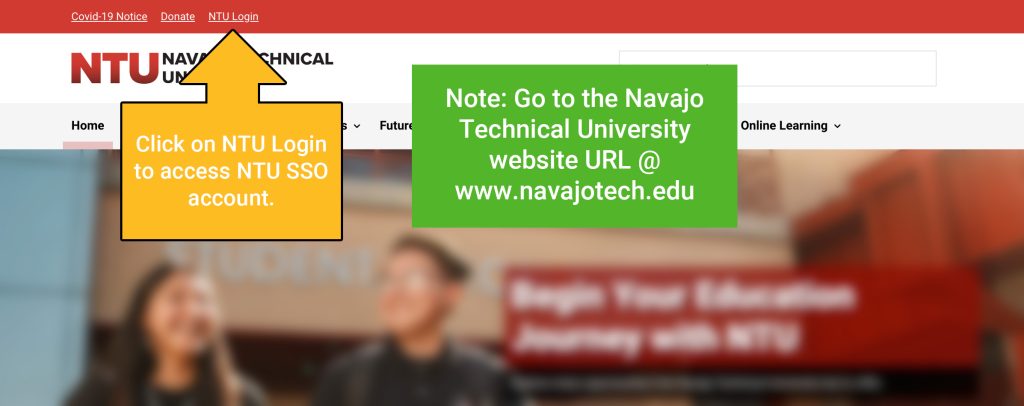
2 Enter your NTU username and password. (Note: IT department creates an account. If you do not have an SSO account, email its@navajotech.edu).
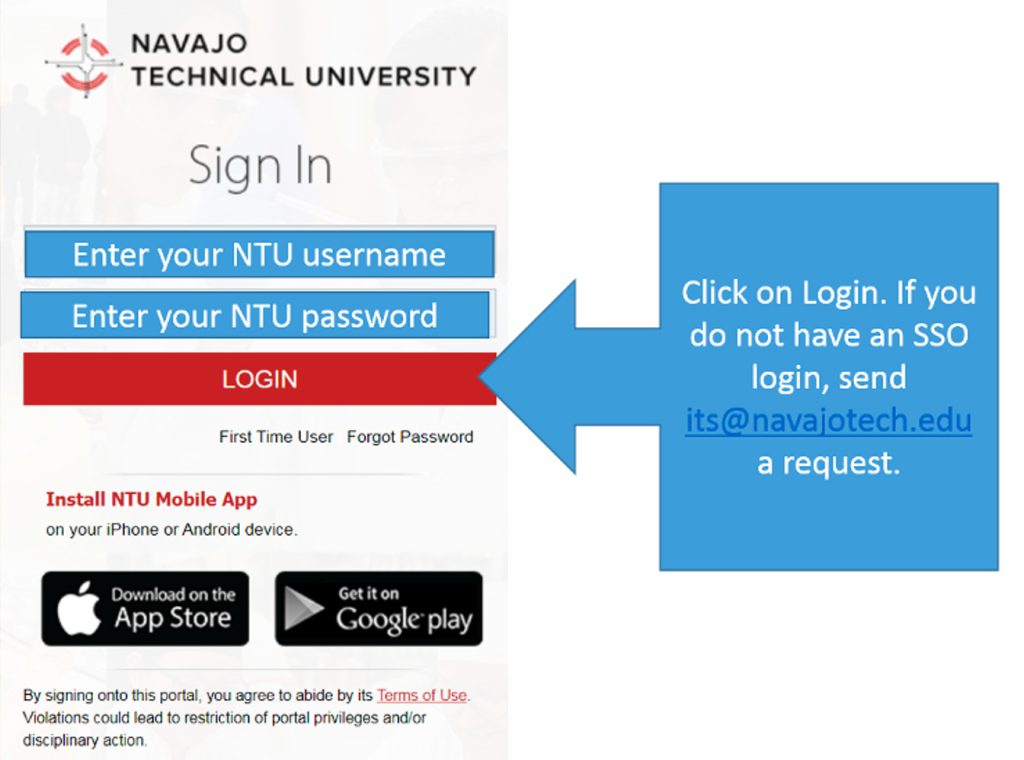
3 Enter your NTU username and password. (Note: IT department creates an account. If you do not have an SSO account, email its@navajotech.edu).
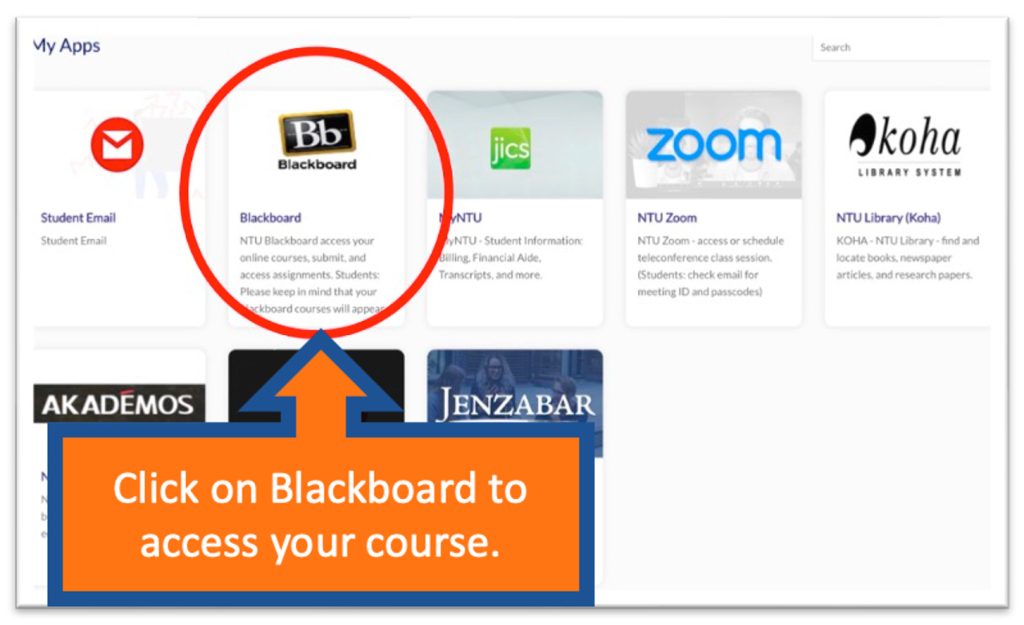
4 Begin navigating your courses.
Another option – How to log into Blackboard Ultra
1
- Go to navajotech.blackboard.com/
- Click on the “Login” link at the top bar
- Use your NTU ID and Password
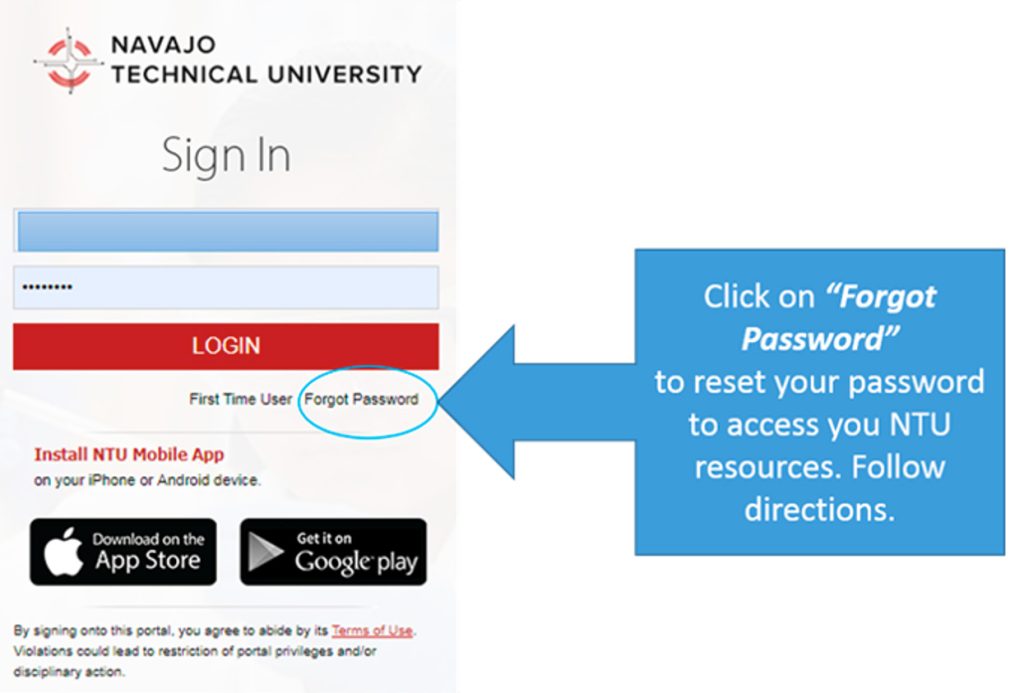
You should now be logged in. If you got a login error, please double-check your password and NTU ID. If you cannot log in to Blackboard Ultra, please click on Forgot Password to reset your password. Check your email to retrieve your password. Your courses are located under “Courses” on the main page, you may need to scroll down if you do not see your course. You will not see any listings if you are not enrolled in any courses.
NOTE: If you are logging into your NTU SSO Blackboard for the first time and experiencing problems, follow these steps to activate your Blackboard access.
2
Logging into Blackboard using SSO
- Log into your SSO account: sso.navajotech.edu/”
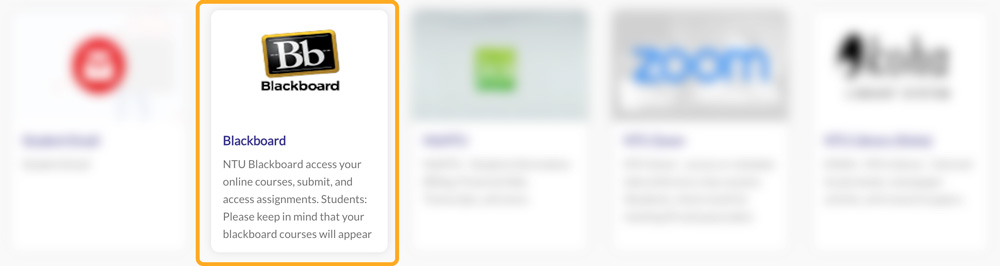
- Click the Blackboard app.
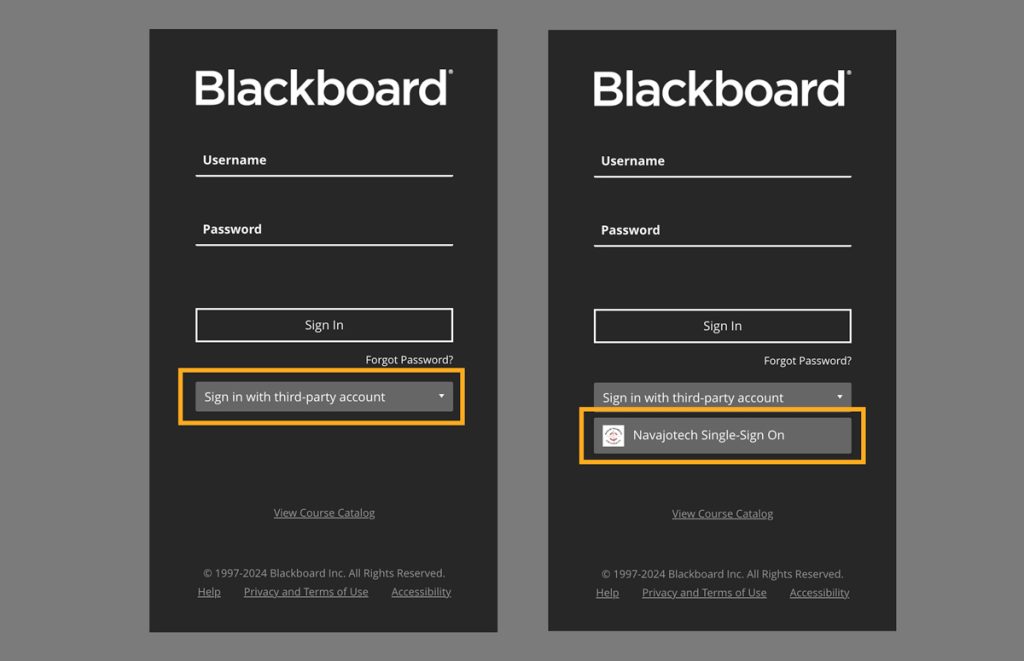
- Select Sign in with third-party account and click on Navajotech Single Sign-On.
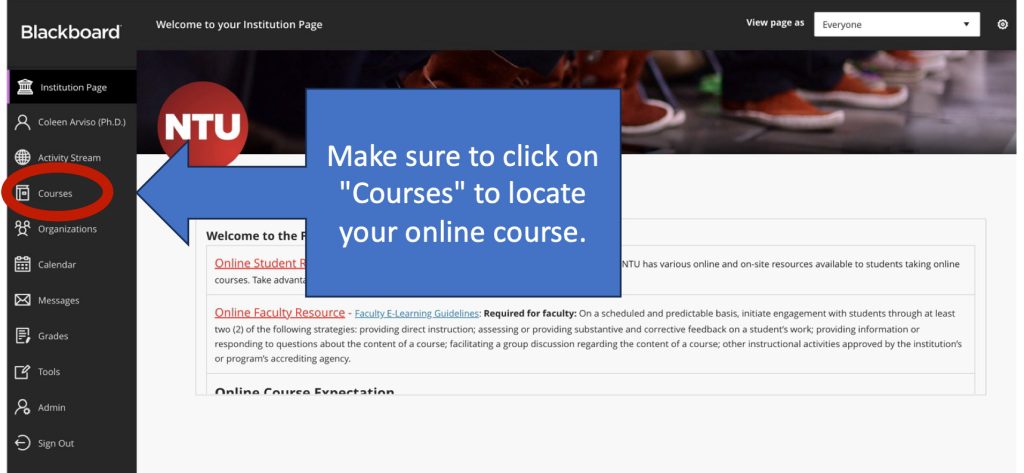
- In Blackboard, your course can be found under “Course”.
3
How to Find Your Course(s)
Your courses are located under “Courses”. You should see semesters listed. Click the down arrow next to the current semester to see the courses for that semester. You will normally be enrolled in a Blackboard Ultra course site the day after you officially register for a course.
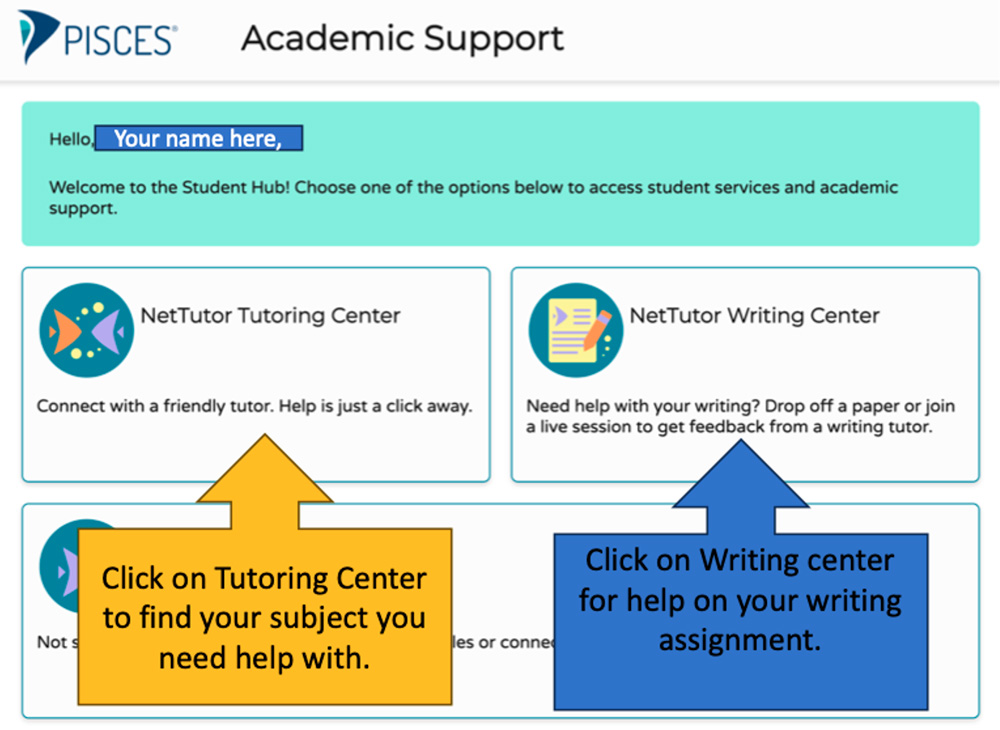
Online Tutoring Tool
You also have access to a free online tutoring tool. You can access the tool in your online course by clicking the NetTutor link. NetTutor has Subject Matter Experts in all areas. Please use this resource to help you with any challenges you may have in your course. For more information, go to URL, www.navajotech.edu/online-tutoring.
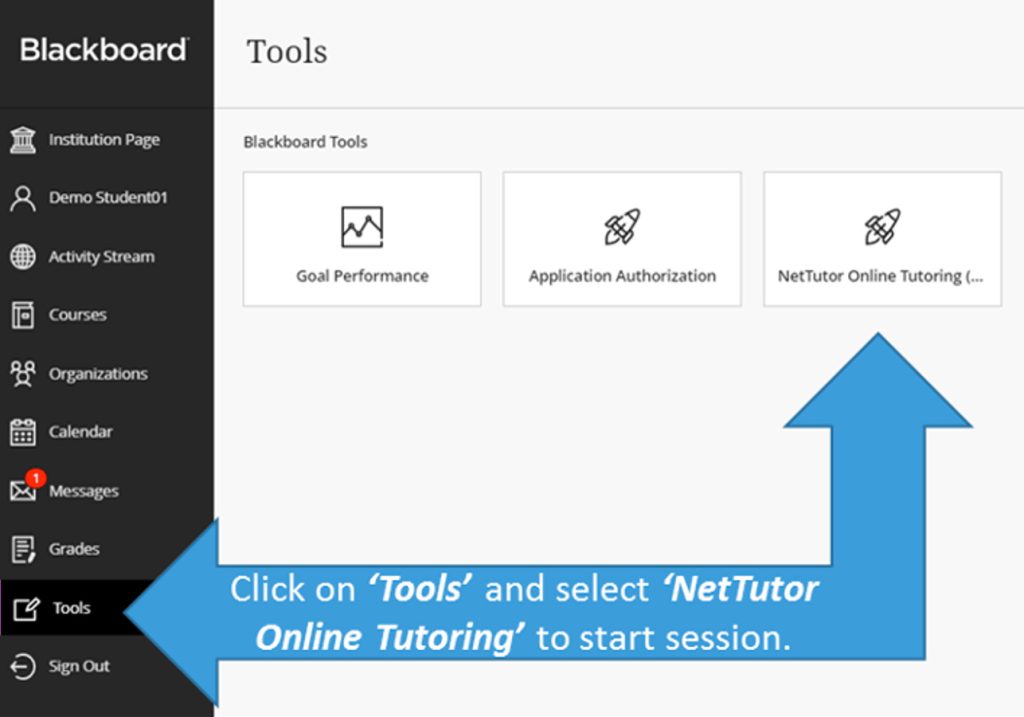
Select a NetTutor Subject Matter Category.
You should now be logged in. If you got a login error, please double-check your password and NTU ID. If you cannot log in to Blackboard Ultra, please click on Forgot Password to reset your password. Check your email to retrieve your password. Your courses are located under “Courses” on the left column, you may need to scroll down if you do not see your course. You will not see any listings if you are not enrolled in any courses.
- You need a reliable computer, a strong internet connection, and the best platform to meet your needs. Blackboard Ultra and Collaborate Ultra requires a modern web browser with WebRTC support. WebRTC (Web Real-Time Communication) is a free, open-source project providing web browsers and mobile applications with real-time communication (RTC) via simple application programming interfaces (APIs).
- Set up a workspace. If possible, this space should be intended for school work only. You want this space to be friendly and inviting, but also encourage productive work behavior. Keep your work environment free of distractions like television, other family members, or household chores. Natural lighting and an ergonomic chair can go a long way in setting up your ideal work environment.
Online Courses Offered
See a complete list of the NTU degree and certificates you can earn online or on-campus an online course listing, and course schedule.
Nitsahakees Bee’anoseel Student Success Center
Tutoring is available to all students in the Nitsahakees Bee’anoseel Student Success Center located on the Crownpoint Campus. The lab offers tutoring services and general use of computers. In lieu of structured tutoring, the facilities may be used simply as a quiet place to work on homework assignments. Hours of operation vary from semester to semester but include some afternoons and evenings. Specific hours are posted on the entrance door and on posting boards throughout the campus.
Tutorial Services is also a source of employment site for students qualified for the work-study program. The Nitsahakees Bee’anoseel Student Success Center is located on the first level of the Student Union Building, Rooms 145 and 146.
College is different from high school!
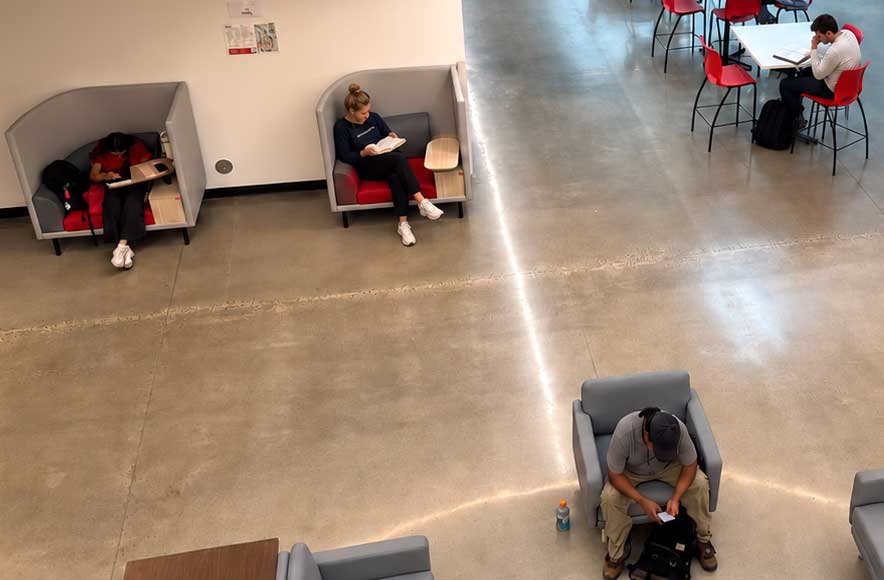
A high school student having the opportunity to take a college class is a positive experience that helps many young people grow as learners and realize their ambition of completing a college degree. But high school students taking NTU dual credit courses must understand the differences between high school and college.
| High School | In College |
|---|---|
| High school is mandatory and usually free | College is voluntary and tuition plus fees are associated with programs. Benefits, Dual Credit courses are free to the student – all tuition, books, and general fees are waived for participating high schools. The High Schools participating can be found on the Dual Credit Program. |
| Student can count on teachers to remind them of responsibilities and to guide them in setting priorities. | Students balance responsibilities and set priorities on their own. High school students need to be ready to take an online course. Complete the Online Learning Readiness Questionnaire help determine what you need to do to success in online learning. |
| Students are usually told in class what they need to learn from assigned readings. | It’s up to the students to read and understand the assigned material. Students enrolled in an Online or Hybrid course need to check their syllabus, Blackboard, or the learning platforms the professor is using to get assignments and due dates. Check your Skyhawk email for information from your professor. If you are not sure, email your professor using your skyhawk email. Getting your NTU SSO login, contacting your professors and tips for online learning successare key to a successful semester. |
| Teachers often take time to remind students of assignments and due dates. | Professors expect students to read, save, and consult the course syllabus (outline); the syllabus spells out exactly what is expected of the student, when it is due, and how it will be graded. Also, logging into Blackboard for coursework and due dates. |
| Teachers carefully monitor class attendance. | Attendance in Online Courses is mandatory just as face-to-face courses. Online students need to login into their Learning Management System (LMS) at least 3-4 times a week. Please refer to your online professor’s course requirements and specifications and to ensure you are actively participating in your online course. Attendance will be tracked through the online student management system by the professor. Attendance will incorporate completion of course requirements, participation in completing course assignments and interactions with professor. If it determined that the student is not meeting attendance policy requirements set forth by NTU Catalog and the professor of the course, the following steps will instituted. |
Online study is different; set a schedule
- Online students are expected to learn mainly by engaging with online materials, supplementary resources and the completion of assessed work.
- Most college professors teaching online classes don’t hold real-time online courses.
- Hybrid courses may use Zoom or some sort of communication interface.
- Make a study plan stay on track with coursework.
- Organize and set a certain amount of hours per day or week to set aside to focus on completing coursework.
- Manage your time carefully to set dedicated study time each day.
What can students do to make sure they succeed in online classes?
Taking an online college class requires students to take on a great deal of responsibility for their own learning. Being successful depends on:
- Planning study time
- Making sure you have access to the right technology. Contact the Information Technology (IT) department to get an NTU SSO account.
- Making time to read the materials and take notes
- STUDY TIME INFORMATION:
Study Time Outside of Class for Face-to-Face Courses
For every credit hour spent in a class, a student is expected to spend two hours (2) outside of class studying the course materials.
Study Time for Hybrid or Blended Courses
For a hybrid or blended course of one (1) credit hour, a student is expected to spend three (3) hours per week studying the course materials.
Study Time for Online Courses For an online course of one (1) credit hour, a student is expected to spend four hours (4) per week studying the course materials.
- STUDY TIME INFORMATION:
- Knowing where to go for help:
What you can expect of Professors?
Every online class has a professor who is available to:
- Answer your questions about the course content
- Grade your assignments
- Help you succeed in the course
Find out more about when to contact your professor and how to reach out to them and the NTU Faculty contact information.
How can you help as a parent?
- Understand school during this period is not easy for professors, students or parents.
- Help keep students on track – if your son or daughter is studying an 16-week class, and they need to be spending 4- 6 hours per week on that class, ask them how have they planned that time and how can you help them stick to that plan.
- Students have full access to all NTU’s Student Services including library, technology support, tutoring servicesand Online Learning Transition for Students – Moving Online.
Support success by asking your child questions like: What assignments are you looking forward to completing this week? Or: Tell me something new you learned today.
Helpful Student Videos
- How to access your Student Email
- How to access MyNTU
- How to Check Your Internet Connection
- Designate Specific Times & Study Space
What are the different meeting types or modes of course delivery?
Meeting Types:
Web-Enhanced course is a traditional course offered face-to-face using Blackboard or some type of learning management system or web presence to enhance the course.
Hybrid-blended (HYB) course is half face-to-face and the other half involves using Blackboard or some type of learning management system or web presence to enhance the course.
Online course (ONL) is offered fully online using Blackboard or some type of learning management system or web presence to enhance the course. You will need to contact your instructor if they are using a different LMS besides Blackboard.
Face-to-Face course is a traditional course that will not use technology in the classroom.
Additional Questions about your Online Course:
Coleen Arviso, Ph.D.
Onlne Learning Director
Navajo Technical University
Email: ccarviso@navajotech.edu
Text Cell: (505) 728-7069 [Ensure you include your full name, course name, and number, a meaningful and clear message – example: Jane Miller, Spring 2027 – need help accessing SP27 SSC 100 ONL College Success Course in Blackboard]