

STEP 1: Welcome to Online Learning
Student Onboarding: Your First Step Toward Success at NTU
At Navajo Technical University, we recognize that a successful online learning experience begins with a thorough and welcoming onboarding process. This initial step introduces you to essential resources—both digital and on-campus—that will support your academic journey. By guiding you in accessing and maximizing these tools, we aim to empower you with confidence and clarity. Embrace this important beginning to lay a strong foundation for a rewarding and enriching education at NTU.
Program Advisors:
VIsit NTU Program Advisors
Online Learning:
505.728.7069
ccarviso@navajotech.edu
NTU Information Technology:
505.387.7363
its@navajotech.edu
STEP 2: Check Your Tech

Check Your Tech
A smooth online learning experience starts with the right technology. Make sure you are fully prepared before your class begins.
Minimum Requirements
Students MUST have:
- A personal computer (Windows or Mac)
- A stable broadband internet connection
- Ability to install required software
If you do not currently meet these requirements, please consider enrolling in an on-campus course instead.
Recommended Setup for Blackboard Ultra
- Latest version of Chrome, Firefox, Safari, or Edge
- Webcam and microphone for live sessions
- Speakers or headphones
- Office productivity tools (Microsoft Office or compatible software)
Remember to check your syllabus for any additional requirements your instructor may list.
NTU Account Setup
NTU Single-Sign-On (SSO)
All students must activate their NTU Login (click HERE for NTU SSO instructions) to access online services, including Blackboard Ultra and email. If you need support, contact the NTU IT Help Desk.
Blackboard Support
- Blackboard Quickstart Guide
https://help.blackboard.com/Learn/Student/Ultra/Quick_Start
(How to navigate the tools you will use in your online courses) - Blackboard Course Help
https://help.blackboard.com/Learn/Student/Ultra
(How to submit assignments, check grades, and use the mobile app)
Third-Party Course Tools
Some courses require access codes or learning platforms, such as:
- Cengage: WebAssign, MindTap
- McGraw-Hill Connect
- Pearson MyLab
These systems may include homework, quizzes, and e-texts that count toward your final grade.
Check your syllabus or speak with your instructor or the bookstore before purchasing.
NTU Information Technology Support
Phone: 505.387.7363
Email: its@navajotech.edu
Help Desk Ticket
Technology Checkout Form
Questions about your Online Course?
Coleen Arviso, Ph.D., Director of E-Learning
Email: ccarviso@navajotech.edu
STEP 3: Access Blackboard Ultra
Access Blackboard Ultra
Blackboard Ultra is the online home for your courses. You will log in, find your classes, view assignments, turn in work, and check your grades here.
How to Log In
You can log in two ways. Choose whichever is easier for you.
Option A: Use the NTU SSO Login
- Go to www.navajotech.edu
- Click SSO Login at the top of the page
- Enter your NTU username and password
- Select Blackboard Ultra to open your courses
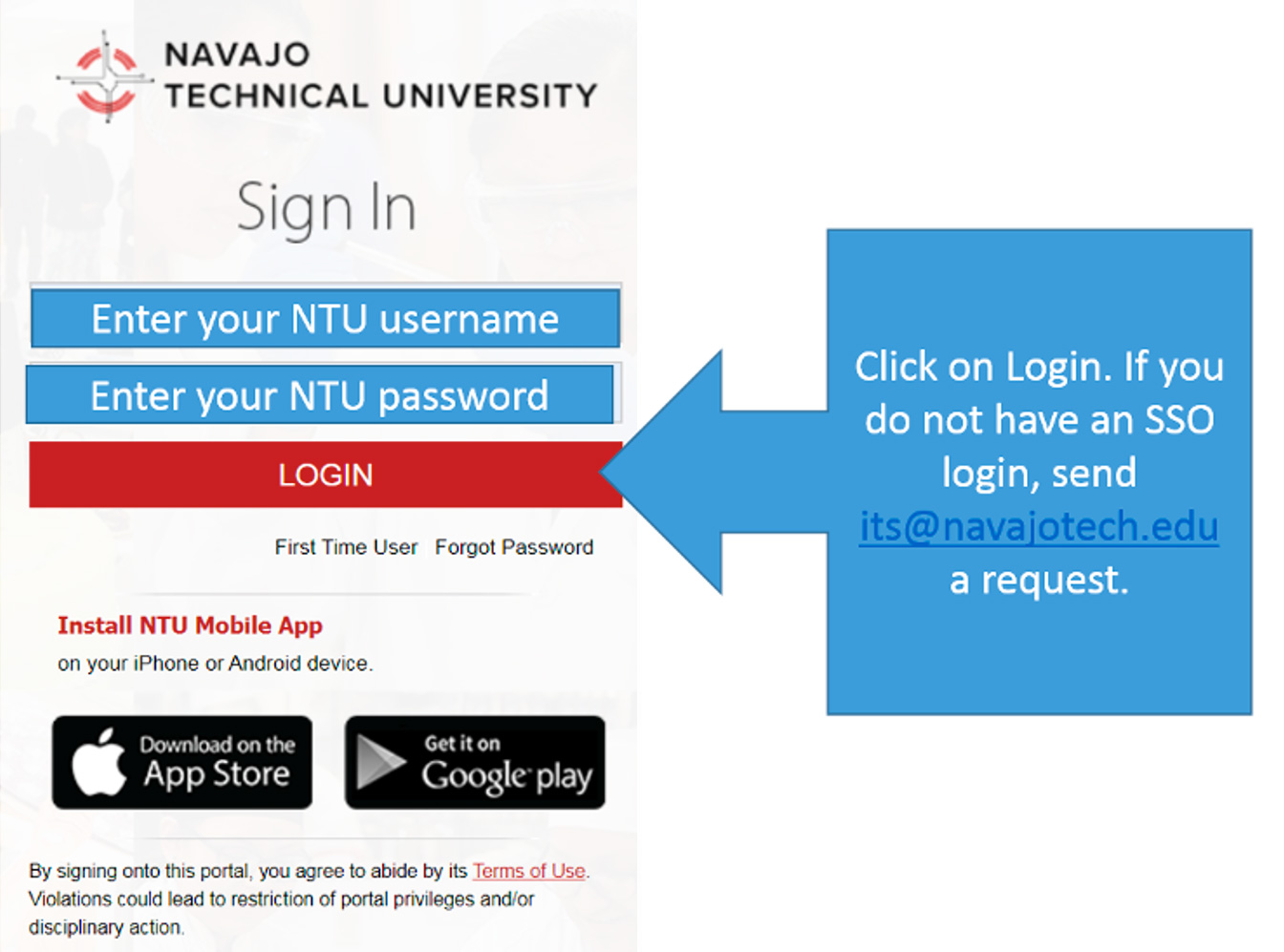
Here is a 45 second tutorial for login: https://scribehow.com/embed-preview/Getting_Started__Q1PNG7ZjTyeig62sPGhzUg?as=video&size=flexible
Option B: Go Straight to Blackboard Ultra
- Go to https://navajotech.blackboard.com
- Click Login at the top right
- Enter your NTU username and password
- Click Courses to view your classes
If your login does not work:
- Try Forgot Password on the login page
- Check your Skyhawk email for reset instructions
- If you still cannot log in, contact the IT Help Desk
Where to Find Your Courses
Once logged in:
- Click Courses
- Use the drop-down arrow to open the current semester
- Your classes will appear under that term
If your course is missing:
- You may not be officially enrolled yet
- Your course may not be published until the first day of class
- Check with your instructor if you are concerned
New to Online Learning? Click here for some important tips! and take this quick self-assessment to make sure you are ready to go!
Start Here: Blackboard Student Orientation
In your Courses tab, look for:
Blackboard Ultra 101: Student Orientation Course
This short course teaches you how to:
Submit assignments
Check grades
Use discussions
Connect with NetTutor
Complete this before your first week for a smoother start.
Online Tutoring: NetTutor
Every online course includes a NetTutor link.
You can meet with real tutors in many subjects.
Use this anytime you need support with coursework.
Help/Info Page: www.navajotech.edu/online-tutoring
Before Classes Begin
Make sure you have:
- Purchased or rented your textbooks
- Logged into Blackboard Ultra successfully
- Checked your syllabus for required software
- Confirmed your computer meets requirements
- Know how to reach IT if needed
- Understand the online attendance policy
- Can log in 3 to 4 times per week
First Day Expectations
- Classes follow the NTU academic calendar
- Log in on the first day and start working right away
- Online attendance counts just like on-campus courses
- Come prepared and have fun!
Student Success Centers
Nitsahakees Bee'anoseel Student Success Center
- Crownpoint Campus
- Tutoring, computers, quiet study area
- Hours posted each semester
- Work-study opportunities available
Technical Assistance
NTU IT Help Desk
Phone: 505.387.7363
Email: its@navajotech.edu
Hours: Mon to Fri, 8 AM to 5 PM
Online Help: www.navajotech.edu/about/it-dept
Course support: Use the contact listed inside your Blackboard Ultra course.
Tips and Guides
NTU Quickstart Guide Video
Click here for the E-Learning Tips for Success
STEP 4: Online Etiquette & Communication

Online Etiquette & Communication
Welcome to your online learning adventure! To foster a positive and respectful environment for all, it's essential to follow some friendly guidelines known as "netiquette." Aim for your messages to be clear, polite, and professional, just like in a classroom or workplace. Here's how you can make your online interactions meaningful and effective:
- Be Respectful and Professional: Address everyone by name and maintain a respectful tone. Use slang and informal language only when appropriate.
- Think Before You Post: Stay on-topic and contribute valuable insights. Proofread your comments for spelling and clarity before sending.
- Respect Privacy and Confidentiality: Never share personal details about yourself or others publicly. Remember, online posts can stay forever.
- Avoid Using All Caps: Writing in all caps can come across as shouting and might upset others.
- Give Constructive Feedback: When replying to classmates, focus on helpful, thoughtful comments about ideas, not individuals.
- Use Emojis Wisely: Emojis can help convey tone but should be used sparingly, especially in formal communication with instructors.
- Respect Cultural Differences: Use neutral, respectful language to create an inclusive space for everyone.
- Be Prepared: Make sure you complete reading assignments and tasks required each week or from each learning module.
Interaction plays a vital role in your online education at NTU. You can communicate with your instructor and fellow students through various tools in Blackboard Ultra.
Contacting Your Instructor
It’s important to understand your instructor’s preferred method of contact at the start of each course, whether via Blackboard messages or NTU email. Check your course syllabus for specific instructions to ensure you’re reaching out correctly.
Blackboard Messages: Use the Messages tab in your course to contact your instructor, classmates, and group members if available.
Discussions and More
Your course offers various communication tools to enhance interaction:
- Discussions: Facilitate conversations about course topics and build a sense of community.
Journals: Private reflections between you and your instructor.
Video Conferencing/
NTU supports several conferencing platforms for coursework, including:
- Zoom: For more details, contact the IT department at its@navajotech.edu.
- Class Collaborate: Learn more on Blackboard Ultra or contact NTU Online Learning for support.
By following these simple, supportive steps, you'll contribute to a welcoming, engaging, and successful online learning community for everyone.
STEP 5: Academic Integrity & AI Use
Academic integrity in our online courses requires that all graded work submitted by students is their own original effort. The use of generative artificial intelligence (AI) tools must be strictly limited to cases where the instructor has given explicit permission.
When AI use is authorized for a specific assignment, students are required to disclose which tools were used and how they contributed to the final submission. Unauthorized use of AI tools for tasks such as writing papers, generating code, solving problems, or taking exams is considered a violation of the academic integrity policy and will be subject to disciplinary action, consistent with existing rules for plagiarism and unauthorized collaboration.
Artificial Intelligence Policy
Navajo Technical University Policy on Student Use of Artificial Intelligence Technology
This policy serves to define guidelines and expectations surrounding the responsible and ethical use of artificial intelligence (AI) tools by students. By fostering a culture of responsible AI use, the policy seeks to enhance learning experiences, promote innovation, and prepare students for ethical engagement with advanced technologies in their academic and future professional endeavors.
STEP 6: Student Support Services
WE ARE HERE TO EMPOWER YOUR ONLINE LEARNING JOURNEY
As Navajo Technical University offers more online courses, we remain committed to supporting your success every step of the way. Below is a comprehensive list of student services designed to help you thrive, even from afar. While some services may be offered virtually, we encourage you to reach out and connect whenever you need support.
Our Student Support Services are dedicated to guiding online students through their studies and personal growth. You can access a variety of resources, including academic tutoring, counseling, and career services, all available through our online portal. Whether you face academic challenges or personal hurdles, know that help is available. We are devoted to creating a supportive environment that honors our Diné culture and language while preparing you for a brighter future.
Here’s how you can make the most of these services:
- Explore online resources: Use the university’s portal for tutoring, learning assistance, and more.
- Reach out proactively: Contact instructors or support staff via email anytime with questions or concerns.
- Access counseling: If you need support, our student counseling center is here for you.
- Stay organized: Keep track of assignments and deadlines, and plan ahead to stay on course.
- Get tech help: Reach out to IT support if you encounter technical issues.
- Participate actively: Engage in online discussions and connect with classmates and instructors to build a strong community.
- Explore career options: Use career services to discover opportunities and plan your future after graduation.
The Student Services Department
Visit the Student Services Department
NTU offers a variety of services to assist and support students in attaining their educational goals. These student-centered services supplement NTU’s academic offerings, help facilitate learning, and empower students to succeed personally as well as academically. Such services include:
STEP 7: Course Readiness Survey
Are you ready to start your online learning journey? Take a few moments to complete the NTU Online Learning Readiness Quiz. This quick assessment is designed to help you understand if you have the necessary tools, skills, and motivation to succeed in our online courses. Whether you’re confident with your computer and communication skills or need a little extra support, this quiz will guide you in preparing for a successful online experience with us.
Tips and Guides
NTU Quickstart Guide Video
STEP 8: Policies & Procedures
To succeed, ensure you have reliable internet and a device like a laptop or tablet. Some courses may need additional software or a webcam—contact your program advisor if you need alternatives. Review the Student Online Learning policy and resources for more details.
To get started, meet the following requirements: demonstrate readiness for online learning, contribute positively to our community, complete the Blackboard Orientation, and acknowledge the Online Learning Policies.
This course will familiarize you with Blackboard, our learning platform. Whether you’re new or experienced, you’ll learn how to navigate, submit assignments, track grades, and communicate effectively. The self-paced course takes about 1-2 hours and is designed to set you up for success.
By the end, you’ll know how to access course materials, submit work, review feedback, and participate actively. The course includes modules on basic Blackboard use, navigation, submitting assignments, and tracking your progress.
Get started on the Course Content page and proceed lesson by lesson. Use the table of contents to move smoothly through your learning experience. We’re excited to support your online success at Navajo Technical University!
STEP 9: Checklist & Next Step
After your admission, set up your NTU accounts and register for classes. Complete the online checklist: submit your application, transcripts, and CIB, and finalize your financial aid by filing the FAFSA. If needed, take the Accuplacer test for course placement. Review your program requirements and plan your study schedule.
Next, log in to Blackboard and complete the mandatory Blackboard orientation course. Verify your access to your NTU accounts, including NTU Skyhawk Email and Blackboard Ultra, and register for courses through MyNTU. Purchase textbooks early, and on the first day, log in to Blackboard and check your email for instructions.
For tech support, contact the NTU IT Helpdesk or the Online Learning department. Stay proactive and focused—you’re on your way to success at Navajo Technical University!